Key Features of Insights Capture for League of Legends

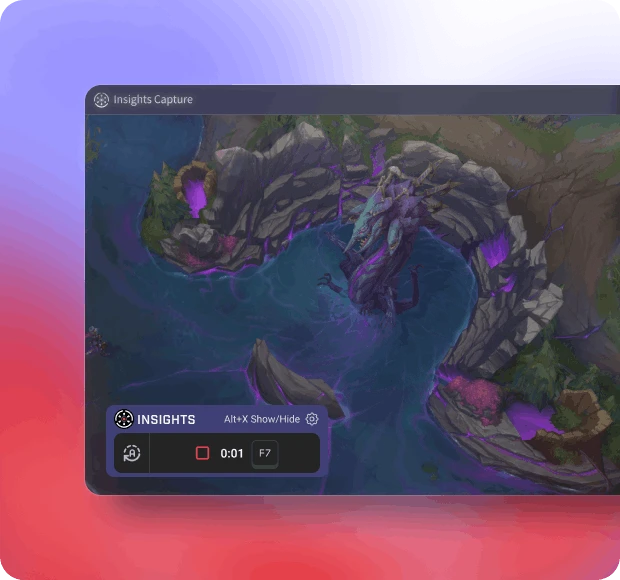
Insights Capture automatically recording a League of Legends match, showing the recording overlay and gameplay interface during a mid-lane fight.Insight Capture
Insight Capture
FEATURE 1

Automatic Recording

Never miss a moment with automatic recording that starts as soon as you launch League of Legends. Capture every kill, strategy, and clutch play without lifting a finger.

Insight Capture
FEATURE 2

Instant Clips and Highlights

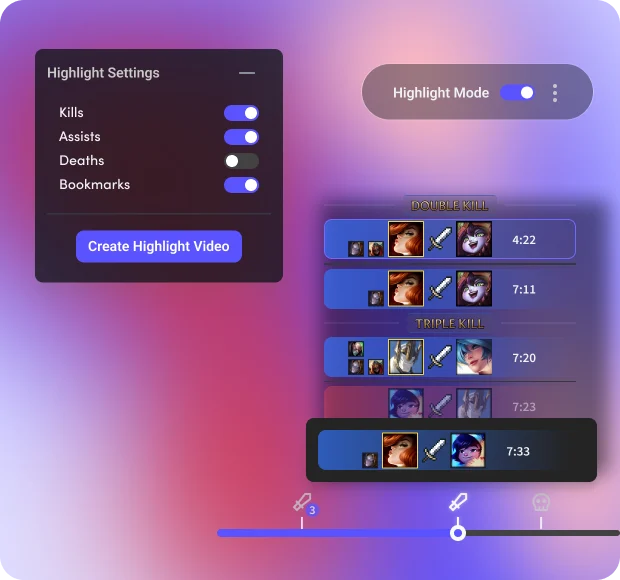
Generate clips and highlights effortlessly. Share your best plays with friends and on social media directly from Insights Capture.

Insights Capture interface showing League of Legends clip timelines and highlight creation tools for generating instant gameplay clips.
Insights Capture showing intelligent timestamping in a League of Legends match, highlighting kills and deaths on the timeline for easy review.
Insights Capture
FEATURE 3

Intelligent Timestamping

Save time with intelligent timestamping that marks key moments in your gameplay, allowing for quick review and analysis of your performance.

Insights Capture
FEATURE 4

Stats

Gain deeper insights into your gameplay with our comprehensive Game Statistics feature. This tool provides detailed analytics on your in-game performance, tracking key metrics such as KDA, damage dealt, kill participation, CS and more.

Insights Capture game statistics panel showing detailed League of Legends match data, including KDA, CS, damage dealt, kill participation, and victory metrics.
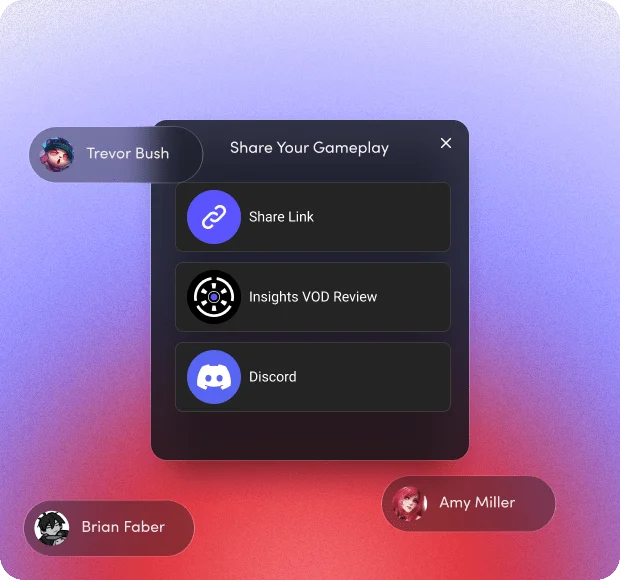
Insights Capture sharing menu displaying video export options for YouTube, TikTok, Discord, Facebook, Reddit, and public links.
Insights Capture
FEATURE 5

Share

Share your best gaming moments effortlessly with our Share Feature. Instantly upload clips and highlights to YouTube, Discord, TikTok, Facebook, X, and Instagram with just a few clicks.

Why Insights Capture is Perfect for League of Legends

Valorant Game Recorder

Valorant Head Coach

Merging Videos

Seamlessly combine multiple recordings into one cohesive video with our easy-to-use merging tool.

Valorant Game Recorder
Date
26 Oct 2022
Valorant Game Recorder
Total recorded
4 h 22 min
Valorant Game Recorder
Game
Valorant
Valorant Game Recorder
Followers
124 K
Valorant Game Recorder

Valorant Head Coach

Desktop Recording

Capture everything on your screen, from gameplay to desktop activities, for comprehensive recordings.


Valorant Game Recorder
Date
26 Oct 2022
Valorant Game Recorder
Total recorded
4 h 22 min
Valorant Game Recorder
Game
Valorant
Valorant Game Recorder
Followers
124 K
Valorant Game Recorder

Webcam

Valorant Head Coach

Integrate your webcam feed into your recordings, adding a personal touch to your gameplay videos.


Valorant Game Recorder
Date
26 Oct 2022
Valorant Game Recorder
Total recorded
4 h 22 min
Valorant Game Recorder
Game
Valorant
Valorant Game Recorder
Followers
124 K
Valorant Game Recorder

Actions Per Minute Graph

Valorant Head Coach

Analyze your performance with a detailed Actions Per Minute (APM) graph, tracking your in-game actions in real time.


Valorant Game Recorder
Date
26 Oct 2022
Valorant Game Recorder
Total recorded
4 h 22 min
Valorant Game Recorder
Game
Valorant
Valorant Game Recorder
Followers
124 K
Valorant Game Recorder

Extensive Storage Management

Valorant Head Coach

Efficiently manage your recordings with extensive storage options, including easy file organization and cloud integration.

Valorant Game Recorder
Date
26 Oct 2022
Valorant Game Recorder
Total recorded
4 h 22 min
Valorant Game Recorder
Game
Valorant
Valorant Game Recorder
Followers
124 K
Valorant Game Recorder

Keyboard and Mouse Input Overlay

Valorant Head Coach

Display your keyboard and mouse inputs on screen to showcase your skills in real time.

Valorant Game Recorder
Date
26 Oct 2022
Valorant Game Recorder
Total recorded
4 h 22 min
Valorant Game Recorder
Game
Valorant
Valorant Game Recorder
Followers
124 K

What League of Legends Players Are Saying

Leonardo P.

Valorant Head Coach

The software is amazing. It's very user friendly, has good in-game options and overlay, and powerful editing tools. I've been looking for years for a good way to record myself to take my gameplay to the next level and this is it!

Aaron D.

Valorant Head Coach

Love everything about it easy to use and records without any framedrops whatsoever.

Insights Capture
Date
26 Oct 2022
Insights Capture
Total recorded
4 h 22 min
Insights Capture
Game
Valorant
Insights Capture
Followers
124 K
Insights Capture
Date
26 Oct 2022
Insights Capture
Total recorded
4 h 22 min
Insights Capture
Game
Valorant
Insights Capture
Followers
124 K

Kairos

@booth_robert380

Insights Capture

Very easy access to all my clips, insights automatically edits my clips into short 2-minute videos, and it does not take up much storage.

Insights Capture
Date
26 Oct 2022
Insights Capture
Total recorded
4 h 22 min
Insights Capture
Game
Valorant
Insights Capture
Followers
124 K

John97

@jamescoook

Insights Capture

It is easy to use especially to share clips with my friends so we can watch it together.

Insights Capture
Date
26 Oct 2022
Insights Capture
Total recorded
4 h 22 min
Insights Capture
Game
Valorant
Insights Capture
Followers
124 K

Josue

@gonzalez77

We just started an esports organization, and I coach a high school team. After using this for one night, I sent the link to both groups of players.

Insights Capture
Date
26 Oct 2022
Insights Capture
Total recorded
4 h 22 min
Insights Capture
Game
Valorant
Insights Capture
Followers
124 K

Zachber

@giiiill1adrian

Insights Capture

It does not take up very much storage or anything else that would take away from your gaming experience. It is easy to send clips to friends and to watch those clips on your own. If you don't want to watch your whole game you can just put the video on highlight mode and watch your favorite moments. I enjoy using it.

Insights Capture
Date
26 Oct 2022
Insights Capture
Total recorded
4 h 22 min
Insights Capture
Game
Valorant
Insights Capture
Followers
124 K

Helloerl

@samm-di

Insights Capture

The recording process is very easy, you just push record/press your keybinded button. I love that it automatically sorts through the footage to find and make highlights.

Insights Capture
Date
26 Oct 2022
Insights Capture
Total recorded
4 h 22 min
Insights Capture
Game
Valorant
Insights Capture
Followers
124 K

David

@better_callhoun

Insights Capture

Reviewing gameplays and learning from them can be done with the aid of insights.gg. It might be beneficial to discuss what went wrong, demonstrate your style of play, and allow others to either learn from it or assist you in fixing your mistakes. Sharing insights.gg would be beneficial as it would enable others to improve their gameplays.

Insights Capture
Date
26 Oct 2022
Insights Capture
Total recorded
4 h 22 min
Insights Capture
Game
Valorant
Insights Capture
Followers
124 K

Platinex

@cam_eric

I really enjoy that I can make clips and upload everything in a cloud, that makes the insights experience smooth and easy.

Insights Capture
Date
26 Oct 2022
Insights Capture
Total recorded
4 h 22 min
Insights Capture
Game
Valorant
Insights Capture
Followers
124 K

Stefan

@connortheking

Insights Capture

Find it highly useful for doing VOD reviews to timestamp and comment on activities.

Insights Capture
Date
26 Oct 2022
Insights Capture
Total recorded
4 h 22 min
Insights Capture
Game
Valorant
Insights Capture
Followers
124 K

Jaysin

@lollylally

Insights Capture

The simple, easy, and low resource way of recording games is awesome. It's also great to use in a team setting for reviewing VODs and coaching.

Insights Capture
Date
26 Oct 2022
League of Legends Recorder
Total recorded
4 h 22 min
League of Legends Recorder
Game
Valorant
League of Legends Recorder
Followers
124 K
Show more
League of Legends Recorder

Getting Started with Insights Capture

League of Legends Recorder
STEP 1

Download Insights Capture and choose your desired recording settings.

League of Legends Recorder
STEP 2

Play the game of your choice and Insights Capture will automatically record and timestamp key moments for you.

League of Legends Recorder
STEP 3

Review your gameplay, edit your clips, and share your best moments with others.

Frequently Asked Questions (FAQ)

1. What does Insights.gg support for League of Legends?
Insights.gg automatically records your League of Legends gameplay, detects important events like kills and deaths, and helps you save or trim highlights instantly. You can also upload full matches to the VOD Review tool to analyze, annotate, and review plays with teammates.
2. Does Insights Capture affect my FPS while playing LoL?
Insights Capture is optimized for low resource usage and is designed to run smoothly alongside League of Legends. Most players experience little to no impact on FPS, even when recording long sessions or multiple matches.
3. What highlights does Insights.gg automatically detect in League of Legends?
The software detects key moments such as kills, deaths, assists, and other important in-game actions depending on the mode. After each match, Insights Capture generates clips you can save, edit, or upload directly to Insights.gg.
4. Can I manually edit or trim my LoL clips?
Yes. If automatic detection misses a moment, you can use manual clipping and the trimming tools to cut, refine, and export any part of your gameplay. You’re always in control of what to save or share.
5. Can I review full League of Legends matches, not just highlights?
Absolutely. The VOD Review tool allows you to upload entire matches, add timestamps, draw on frames, leave comments, and run collaborative review sessions with teammates or coaches.
6. Is Insights Capture free to use for League of Legends?
Yes. Recordings, automatic highlights, and basic storage are completely free. If you need more cloud space or team-oriented features, you can upgrade to a paid Insights.gg plan at any time.
7. What should I do if Insights Capture stops recording LoL or misses highlights?
Try restarting both League of Legends and Insights Capture, and ensure that game detection is enabled. If issues persist, check your Overwolf permissions or contact Insights.gg support through the Help Center or Discord for troubleshooting.

Start Using Our VOD Review Tools Today!

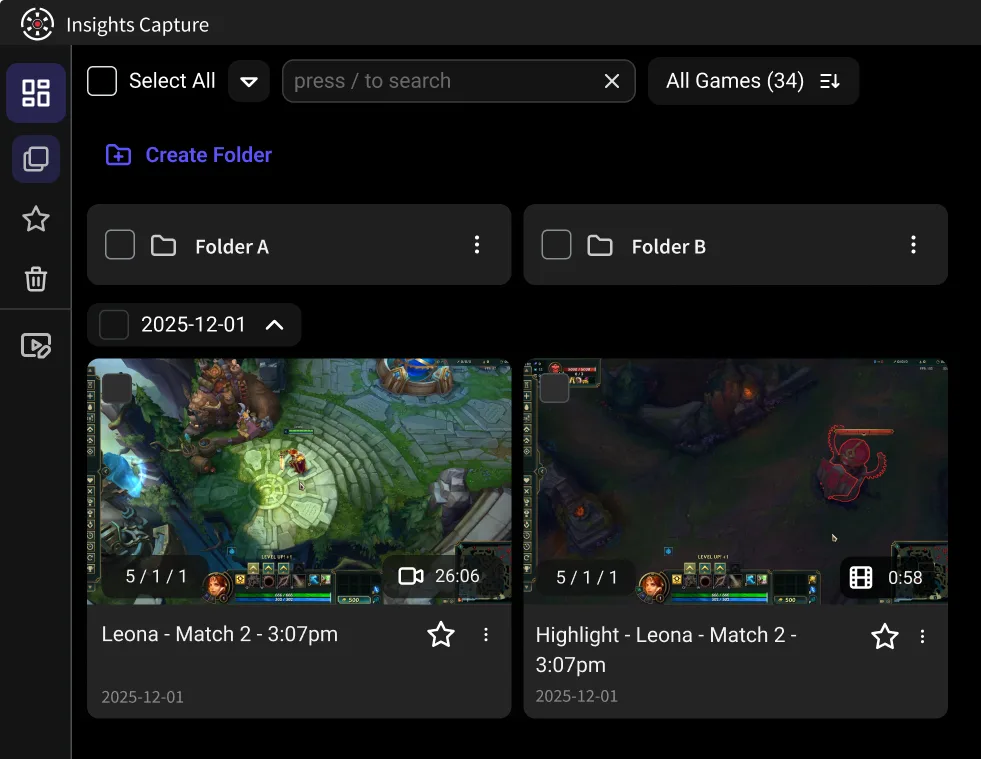
Insight Capture recordings dashboard with folders and Valorant clip cards in clipping software.