7 Best Medal Alternatives for Clipping (2026)

Players usually look for a Medal alternative for three reasons: the watermark on free downloads, the 20-minute clip cap, and links that expire. Here are seven alternatives compared on what each is actually best at — and where each falls down.
Medal.tv is a good app. But there are three common reasons players go looking for a Medal alternative: the watermark on free downloads, the 20-minute clip cap, and links that expire. Add “I want something lighter on my PC” and you've covered most of the searches that land here.
Below are seven alternatives, what each is actually best at, and where each falls down. If you are still deciding whether to leave at all, our guide to Medal clips covers how the app saves and downloads them, and exactly which limits sit on the free plan.
1. Insights Capture — Best Free All-Rounder
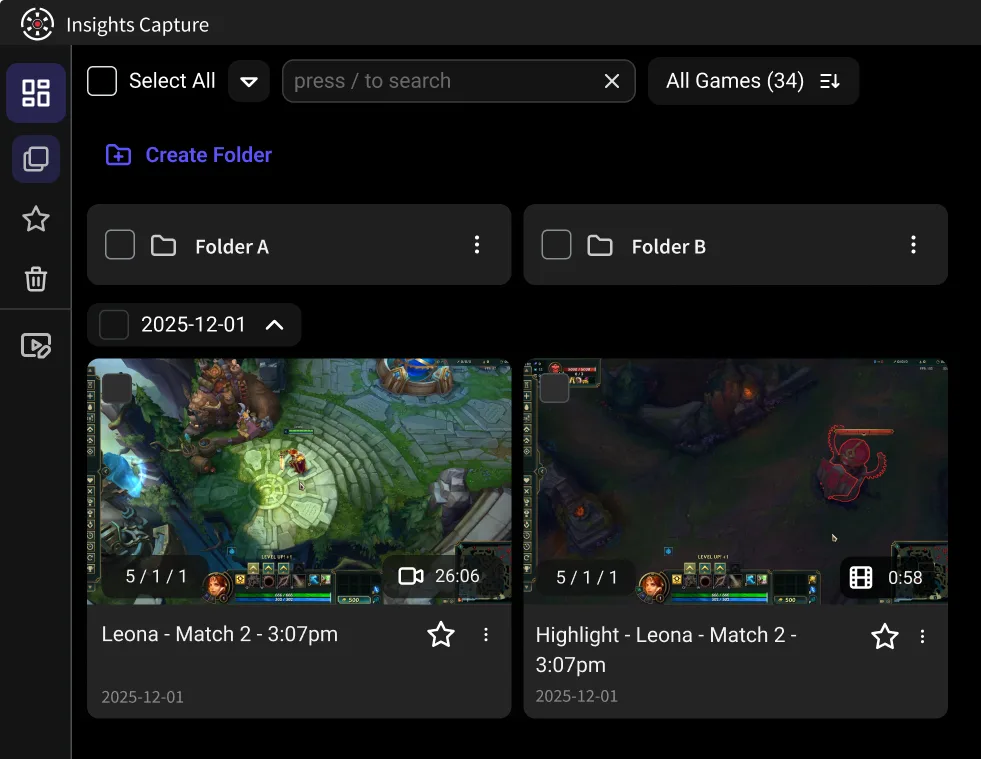
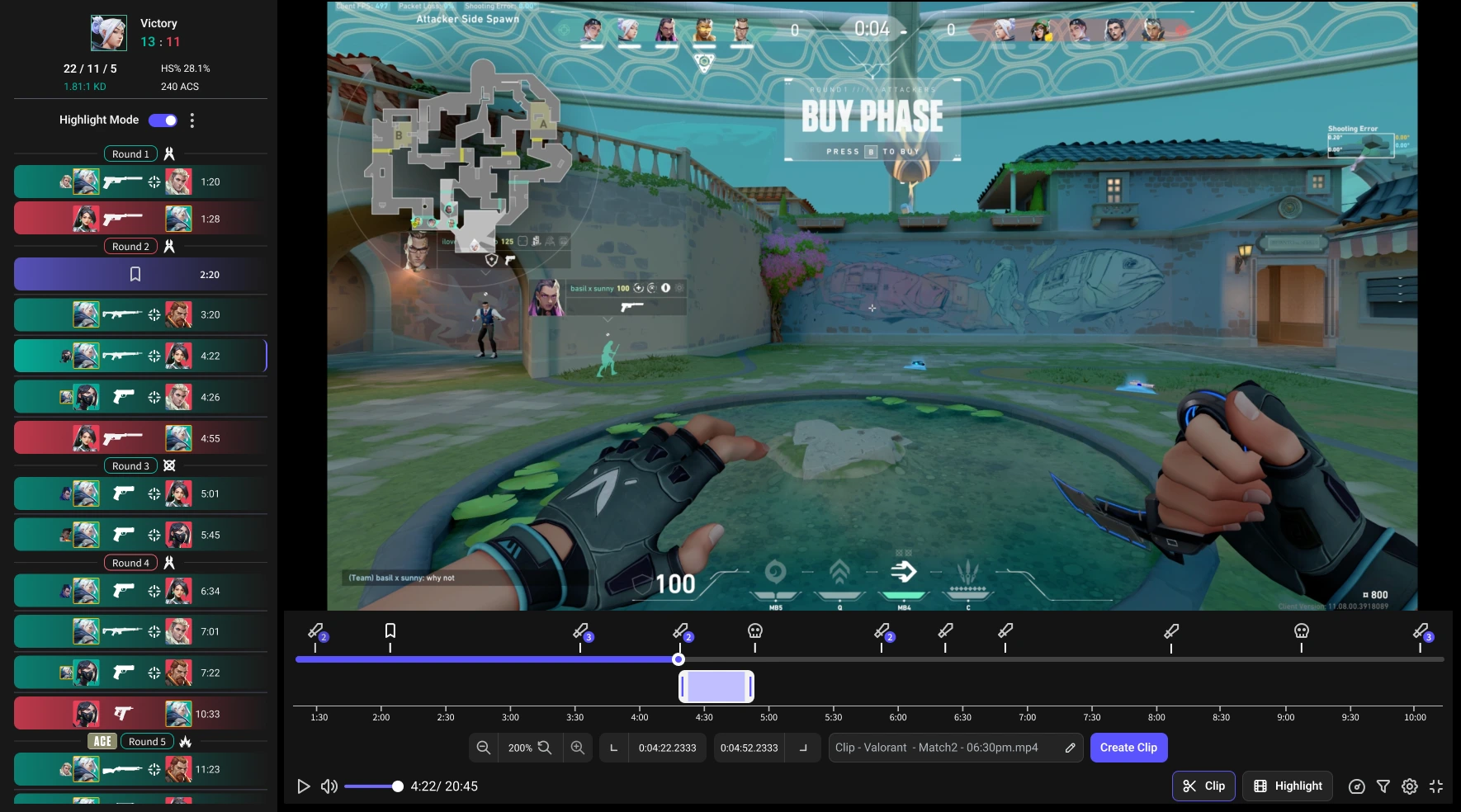
Records every match automatically with no FPS loss, marks kills and key events on a timeline, and clips in two clicks. The free plan has no watermark, no quality cap, and no clip-length wall, and share links don't expire. It also includes a VOD review workspace with timestamped comments and drawing tools for reviewing with teammates — the feature most alternatives on this list simply don't have.
Unique to Insights: the Shard Program pays you in gift cards for recordings you're already making (2,000 Shards = $1, $5 minimum redemption, 100+ gift card options, $100,000+ paid out to date; 18+, Windows only).
Pros: free with no watermark, automatic highlight detection, permanent links, team review, rewards program
Cons: Windows only, no public community feed
Best for: players who want to keep everything, and teams who review
{{button}}
2. NVIDIA ShadowPlay — Best for Zero Performance Cost
Built into GeForce drivers. Instant Replay keeps a rolling buffer and saves it on a hotkey with almost no FPS impact, because encoding runs on the GPU.
Pros: effectively free, lowest performance overhead, dead simple
Cons: NVIDIA GPUs only, manual capture with no event detection, minimal editing and sharing
Best for: GeForce owners who just want a clean hotkey
3. OBS Studio — Best for Total Control
The open-source standard. Configure a replay buffer, bind a hotkey, and get exactly the resolution, bitrate and format you specify.
Pros: free and open source, unmatched configurability, no limits of any kind
Cons: genuine setup time, manual only, no library, editor or sharing layer
Best for: people who already stream with OBS
4. Xbox Game Bar — Best Zero-Install Option
Already on your Windows PC. Win + Alt + G saves the last 30 seconds. On an Xbox console the equivalent is Game DVR — covered in our guide to Gamer DVR and Xbox clips.
Pros: pre-installed, free, works nearly everywhere
Cons: no auto-capture, no editor, basic quality control
Best for: occasional clippers who don't want another app
5. SteelSeries GG Moments — Best Lightweight Auto-Clipper
Detects key moments in supported games, trims quickly, shares easily, and keeps a light footprint.
Pros: simple, low overhead, quick sharing
Cons: narrower game support, basic editing
Best for: players who want auto-clipping without much software
6. Outplayed — Best Plug-and-Play on Overwolf
Overwolf-based auto-capture across a large game list, saving kills and wins without setup.
Pros: automatic, free, broad game coverage
Cons: Overwolf overhead can be noticeable on lower-end PCs, limited editing
Best for: casual players who want it hands-off
7. Steam Game Recording — Best if You Live in Steam
Steam's own background recording with timeline markers for supported titles, built right into the client.
Pros: no extra install if you're on Steam, integrated with your library
Cons: Steam titles only, limited event detection and sharing
Best for: Steam-only players
How to Choose
Ask what actually annoyed you about your current tool. Watermark or expiring links → Insights. Performance → ShadowPlay or Insights. Control → OBS. Nothing installed → Game Bar. Team improvement → Insights, since it's the only one here with real review tools.
For a direct feature-by-feature breakdown, see Insights vs Medal.
FAQs: Medal Alternatives
1. What's the best free Medal alternative with no watermark?
Insights Capture — the free plan has no watermark, no quality cap and no clip-length limit.
2. Is there a Medal alternative that clips automatically?
Yes: Insights Capture, SteelSeries Moments and Outplayed all auto-detect in-game events. ShadowPlay, OBS and Game Bar are manual.
3. What's the best ShadowPlay alternative for AMD users?
Insights Capture or OBS — both are GPU-agnostic. ShadowPlay itself requires an NVIDIA card.
4. Do I have to stop using Medal?
No. These tools run alongside each other fine; plenty of players keep one for social posting and another for their permanent library.
5. Which alternative is best for teams?
Insights, because it's the only tool here with a VOD review workspace — timestamped comments and drawing tools for reviewing matches together.
Final Thoughts
There's no single best clipping app — there's the one that matches what you're doing. If your complaint list starts with watermarks, expiring links, or “I want to actually review this with my team,” start with Insights Capture. It's free, and there's nothing to un-learn if you switch back. Contact us now!