Insights Capture vs Outplayed: The Outplayed Alternative Without Overwolf (2026)

Outplayed and Insights Capture both auto-clip your matches — the differences are what they run on and what happens after the clip. One needs Overwolf and shows ads; the other runs standalone and adds a team review workspace.
Outplayed and Insights Capture are the two names that come up whenever gamers want their matches recorded and their highlights clipped automatically. They are genuinely similar — both detect game events and capture your best moments without a hotkey — which makes the differences matter more. The short version: the Outplayed app runs on the Overwolf engine and shows ads on its free tier; Insights Capture runs standalone with no Overwolf, no ads and no watermark, and adds a team VOD review workspace Outplayed doesn't have.
The Quick Verdict
- Outplayed is a solid auto-clipper from the Overwolf app store with a big supported-game list and a clean built-in editor. Free with ads; Outplayed Premium removes them.
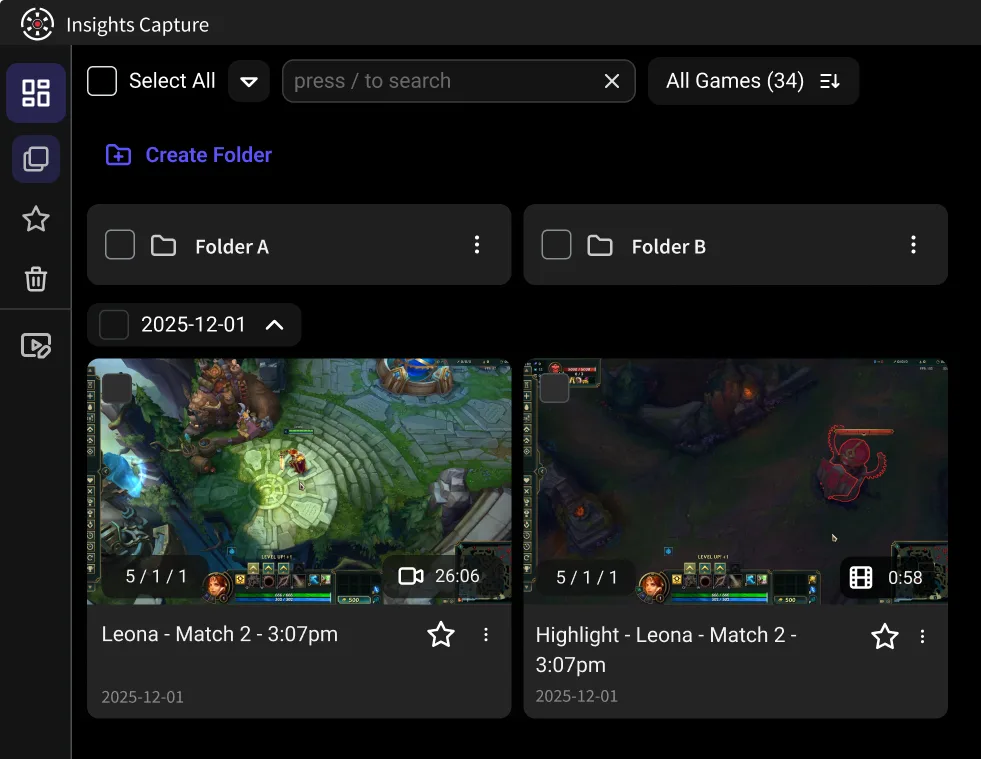
- Insights Capture does the same automatic capture across 10,000+ games, is free without ads or watermarks, no longer needs Overwolf at all, and connects to Insights.gg's review tools — timestamped comments, drawing tools, merged team POVs.
- If you mostly clip for fun, either works. If you also review your gameplay — or a teammate ever asks “can you send the whole match?” — Insights is built for exactly that.
What Outplayed Does Well
- Automatic highlight capture. Outplayed can automatically detect game events — kills, deaths, objectives — and save those moments while you keep playing.
- Capture modes. Highlights, full match, or full session, with capture settings for resolution, FPS and encoder in the advanced options.
- A capable editor. Trimming and the Supercut feature (stitching highlights into one video) are built in.
- Wide game support through Overwolf's game events system.
Where Outplayed Loses People
The recurring complaints behind “Outplayed alternative” searches:
- It requires Overwolf. Outplayed is an Overwolf app — installing it means installing the Overwolf client, its overlays and its background processes. “What is Overwolf and why is it on my PC?” is one of the most-asked questions about it, and some players simply don't want the extra layer running while they play.
- Ads on the free tier. The free version shows ads; removing them means subscribing to Outplayed Premium.
- Recording issues tied to the stack. “Outplayed not recording” troubleshooting usually routes through Overwolf — driver conflicts, the client needing reinstalls, capture breaking after updates.
- No review layer. Clips save to a media folder; there's no team workspace, no timestamped feedback, no way to review a match together.
Insights Capture vs Outplayed: Feature by Feature
Engine. Outplayed runs on Overwolf. Insights Capture V3 is fully standalone — one app, no third-party client, fewer background processes competing with your game.
Price. Both are free to start. Outplayed's free tier carries ads; Insights Capture is free with no ads and no watermark.
Automatic capture. Both automatically detect game events and record highlights or the full match. Insights marks events on a timeline of the complete recording, so you can also grab the moment before the kill feed lit up — the flank, the rotation, the setup.
Editing. Both include trimming and combining clips. Insights adds cloud share links that don't expire, plus merging recordings from different players — your POV and your duo's in one video.
Review. The real separator. Insights.gg includes a VOD review workspace: upload the match, drop timestamped comments, draw on frames, review as a team. Coaches and esports teams use it daily; Outplayed has nothing in this category.
Rewards. Insights' Shard program pays you to play — earn Shards for gift cards while the recorder runs. Outplayed has no equivalent.
Performance. Both use GPU encoding, so FPS impact is minimal on either. Removing the Overwolf layer gives Insights a lighter total footprint.
Switching From Outplayed
Nothing about switching is destructive: your existing Outplayed clips are ordinary video files in its media folder and stay playable. Install Insights Capture, play a match, and compare the results side by side — both apps can even run at once while you decide, though you'll usually want only one auto-recorder enabled long-term.
{{button}}
How to Disable or Uninstall Outplayed
When you are ready to keep one auto-recorder, turn Outplayed off so two apps are not capturing the same match:
- Open the Overwolf client, which is where the Outplayed app runs.
- Find Outplayed in your installed apps, then disable or uninstall it. Overwolf apps may also be listed in Windows Settings > Apps > Installed apps.
- If you no longer use any other Overwolf apps, you can uninstall Overwolf itself the same way.
Uninstalling does not delete your existing clips; they stay in Outplayed's media folder until you remove them. Insights Capture V3 runs as a standalone screen recorder, so you do not need Overwolf to keep recording. If you would rather have full manual control than automatic clips, OBS Studio is the other common option.
How They Compare to the Rest
Outplayed's closest rival has always been Medal — our Insights vs Medal comparison covers that side, and best Medal alternatives ranks the field. For manual-control options like OBS see Insights vs OBS, and for the built-in Windows option see Insights vs Xbox Game Bar.
FAQs: Outplayed and Alternatives
1. Is Insights Capture better than Outplayed?
For clipping alone they are close; Insights wins on running standalone (no Overwolf), having no ads or watermark, and including team VOD review. Outplayed's Supercut editor is its standout feature.
2. Do I need Overwolf for Outplayed?
Yes — Outplayed is an Overwolf app and cannot run without the Overwolf client. Insights Capture V3 requires no Overwolf.
3. Is Outplayed free?
Yes, with ads; Outplayed Premium removes them. Insights Capture is free without ads.
4. Is Outplayed safe to use?
Yes — Overwolf apps are legitimate software, and Outplayed is one of the platform's flagship apps. “Safe” isn't the issue; the extra client running alongside your games is what some players object to.
5. Is Outplayed or OBS better?
Different tools: Outplayed auto-clips, OBS gives manual control and streaming. If you're choosing between those two philosophies, read Insights vs OBS.
6. Does Insights.gg affect FPS?
No meaningful impact — GPU-accelerated encoding keeps the recording cost to a few percent, and there's no Overwolf overlay on top.
Final Thoughts
Outplayed proved that automatic clipping is how most players actually want to capture games. Insights Capture takes the same idea further: no Overwolf underneath, no ads on top, and a review workspace after the match — because saving the highlight is step one, and getting better from it is the point. Download it free and see which one earns the autostart. Contact us with questions.