Insights Capture vs NVIDIA ShadowPlay: The ShadowPlay Alternative for Any GPU (2026)

ShadowPlay is a good replay buffer — if you have an NVIDIA GPU and never forget the hotkey. Insights Capture records every match automatically on any GPU and marks the highlights. Here's the honest head-to-head.
Searching for a ShadowPlay alternative usually starts one of two ways: you don't have an NVIDIA GPU, or you do and you're tired of Instant Replay's quirks — the hotkey you forgot to press, the recording that captured the wrong monitor, the clips with crackling audio. NVIDIA ShadowPlay is a genuinely good replay buffer for GeForce owners; Insights Capture is a full game recorder that works on NVIDIA, AMD and Intel alike, records whole matches automatically, and marks the highlights for you. Here is the honest comparison.
The Quick Verdict
- ShadowPlay (now the NVIDIA App overlay) is the lightest way to save the last few minutes of gameplay with a hotkey — if you have an NVIDIA GPU and never forget to press it.
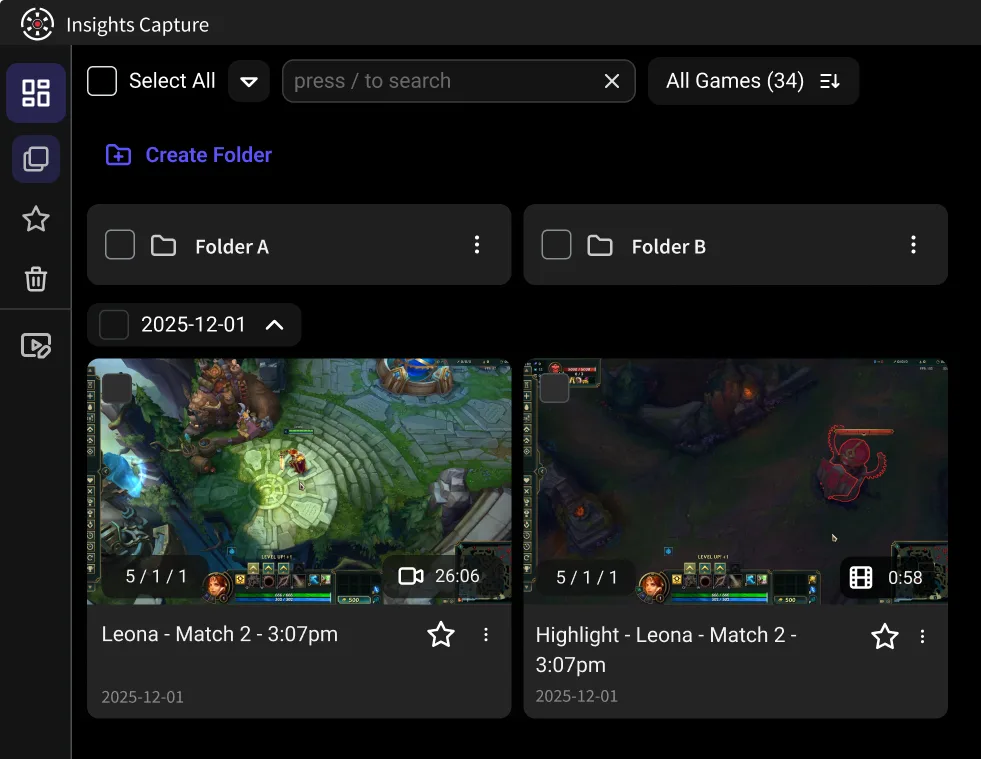
- Insights Capture records every match in the background on any Windows PC, marks kills and wins on a timeline, and lets you clip after the game — no hotkey, no buffer window, no GPU requirement.
- Both are free, and both use GPU encoding (NVENC on NVIDIA cards) so neither will meaningfully hurt your FPS.
What ShadowPlay Does Well
Credit where due. ShadowPlay, born in GeForce Experience and now living in the NVIDIA App, popularized instant replay on PC:
- Minimal overhead. Recording runs on the GPU's NVENC encoder, so performance cost is small even at high resolution.
- Instant Replay saves the last few minutes — 30 seconds up to 20 minutes — with one hotkey press.
- Free with your GPU. Nothing to install beyond NVIDIA's own software, and quality settings up to 4K.
Where ShadowPlay Falls Short
The complaints that send users hunting for NVIDIA ShadowPlay alternatives are consistent:
- NVIDIA GPUs only. There is no ShadowPlay for AMD or Intel. (AMD's equivalent is ReLive in the Adrenalin software — a similar replay buffer with similar limitations.)
- Everything is manual. No game-event detection: if you didn't press the hotkey, the play is gone. The replay buffer is a memory aid, not a memory.
- Sharing and editing are bare. You get video files in a folder; trimming, organizing and posting happen elsewhere.
- Reliability quirks. Wrong-monitor recording in multi-monitor setups, desktop capture toggling itself, audio crackle after Windows updates — the NVIDIA forums document all of it.
- No review workflow. Files on a hard drive are not a library; nothing helps you find, compare or study your gameplay later.
Insights Capture vs ShadowPlay: Feature by Feature
Hardware. ShadowPlay requires an NVIDIA GPU. Insights Capture runs on any reasonably modern Windows PC — NVIDIA, AMD or Intel — and uses whichever hardware encoder your system has (NVIDIA NVENC, AMD AMF, Intel Quick Sync).
Capture model. ShadowPlay keeps a rolling replay buffer and saves it on demand. Insights Capture records the full match automatically the moment your game launches — nothing to press, ever.
Highlights. ShadowPlay has limited highlight support in a handful of games. Insights Capture detects kills, wins and key events across 10,000+ titles and marks them on a timeline, so after the match your best moments are already flagged.
Clipping and editing. ShadowPlay: find the file, open an editor. Insights Capture: two clicks on the timeline, built-in trim and merge, then a share link straight to Discord or social media — or upload to YouTube.
Review. Insights.gg includes a VOD review workspace with timestamped comments and drawing tools for teams. ShadowPlay has nothing comparable.
Streaming. ShadowPlay can broadcast simply; serious streaming belongs to OBS Studio either way — see our Insights Capture vs OBS comparison.
The AMD Question
“Is there an AMD equivalent to ShadowPlay?” — sort of. AMD ReLive offers an instant replay buffer in Adrenalin, and it shares ShadowPlay's manual-only design. If you switched from NVIDIA to AMD and miss instant replay, Insights Capture is the more complete answer: automatic recording, highlight detection and editing on any GPU, rather than a buffer tied to one vendor's software.
Can You Use Both?
Yes — they don't conflict. Some players keep ShadowPlay's Instant Replay as a reflex hotkey and run Insights Capture as the always-on layer that catches everything the hotkey missed. Since both encode on the GPU, running the pair still costs very little performance.
{{button}}
Other ShadowPlay Alternatives Worth Knowing
- OBS Studio — the free, open-source power option; a replay buffer with total control, but real setup effort: Insights vs OBS.
- Xbox Game Bar — already in Windows, fine for occasional clips: Insights vs Xbox Game Bar.
- Medal and Outplayed — auto-clipping apps in the same category as Insights: Insights vs Medal and Insights vs Outplayed.
- Full ranked list: 10 best game clipping software.
More ShadowPlay Alternatives by Use Case
- AMD ReLive, part of AMD Software: Adrenalin Edition, is the built-in recorder for AMD graphics cards, with its own instant replay.
- Medal works on any GPU, auto-clips highlights like kills and aces without a hotkey, has a built-in editor and gives you a share link right after clipping. Its mobile app syncs clips between PC and phone.
- SteelSeries GG adds clip editing and export, with more clipping options than ShadowPlay.
- GPU Screen Recorder brings ShadowPlay-style instant replay to Linux and supports NVIDIA, AMD and Intel encoding.
- OBS Studio is free and open source on Windows, macOS and Linux, with multiple scenes, audio mixing and separate audio tracks.
- Bandicam records at very high frame rates, up to 480 FPS.
- Xbox Game Bar is built into Windows, so there is nothing to install.
FAQs: ShadowPlay Alternatives
1. What should I use instead of ShadowPlay?
If you want automatic recording with highlight detection on any GPU, Insights Capture. If you want maximum manual control, OBS Studio's replay buffer.
2. Is ShadowPlay or OBS better?
ShadowPlay is lighter and simpler; OBS is far more capable and works on any GPU. For pure clip-saving with zero effort, neither beats an automatic recorder.
3. Does NVIDIA Instant Replay reduce performance?
Only slightly — NVENC encoding is efficient. Insights Capture uses the same hardware encoding, so performance is comparable; the difference is what happens automatically.
4. Can you use ShadowPlay without an NVIDIA GPU?
No. ShadowPlay is exclusive to NVIDIA hardware — that's the number-one reason people need an alternative.
5. Does ShadowPlay still exist?
Yes, though the branding moved: the features live in the NVIDIA App (formerly GeForce Experience) as the Share overlay with Instant Replay.
6. Does Insights Capture affect FPS?
No meaningful impact — GPU-accelerated encoding keeps recording cost to a few percent on mid-range hardware.
Final Thoughts
ShadowPlay is a good hotkey. Insights Capture is a memory. If your GPU happens to be NVIDIA and you never miss a press, ShadowPlay will serve you fine — but if you want every match recorded, every highlight marked, and clips your teammates can review together, download Insights Capture free and stop depending on reflexes. Contact us with questions.